Designing a Seamless MVP for a Responsive Car Marketplace

UX/UI Design
Project Overview
Motor Library was born out of a need to simplify and modernize the online car shopping experience. With so many marketplaces feeling cluttered or impersonal, our goal was to design an MVP that puts users first. By offering a clean, intuitive, and responsive platform, we'll make finding, comparing, and connecting over cars feel effortless for our users.

Motor Library is also built to gain the trust of dealerships and private sellers, providing them with a reliable, user-friendly space to list their vehicles and reach potential customers. From a business perspective, the MVP also serves a strategic purpose: to attract early adopters, grow brand visibility, and begin asserting a presence in the competitive online car sales market.


Background
Motor Library was founded by Tumelo Matebesi following the success and growth of his YouTube channel, where he shared content around the automotive industry. Through ongoing engagement with viewers and interactions with various dealerships, Tumelo was inspired to move beyond content creation and step into the business side of the market, building a platform that connects buyers, private sellers, and dealerships in a more trusted and streamlined way.
Timeframe
4 Weeks
My Role
User Research, UX & UI Design, Prototyping, Testing
Tools
Figma, Canva, Google Forms
The challenge

The challenge for Motor Library was to design a responsive and user-friendly platform that bridges the gap between car buyers, private sellers, and dealerships. With a focus on creating a seamless browsing and purchasing experience, the website needed to foster trust among both individual sellers and larger dealerships. The platform aimed to stand out in a competitive market by asserting its brand presence, building visibility, and attracting early users

The Goal
To design a seamless, engaging experience to help Motor Library stand out and build a loyal user base.

The Motor Library platform aimed to simplify the car-buying process, foster trust and transparency, and establish the brand’s presence in the competitive automotive market. The objective was to design a seamless, engaging experience to attract early users and sellers, ensuring long-term success and growth.
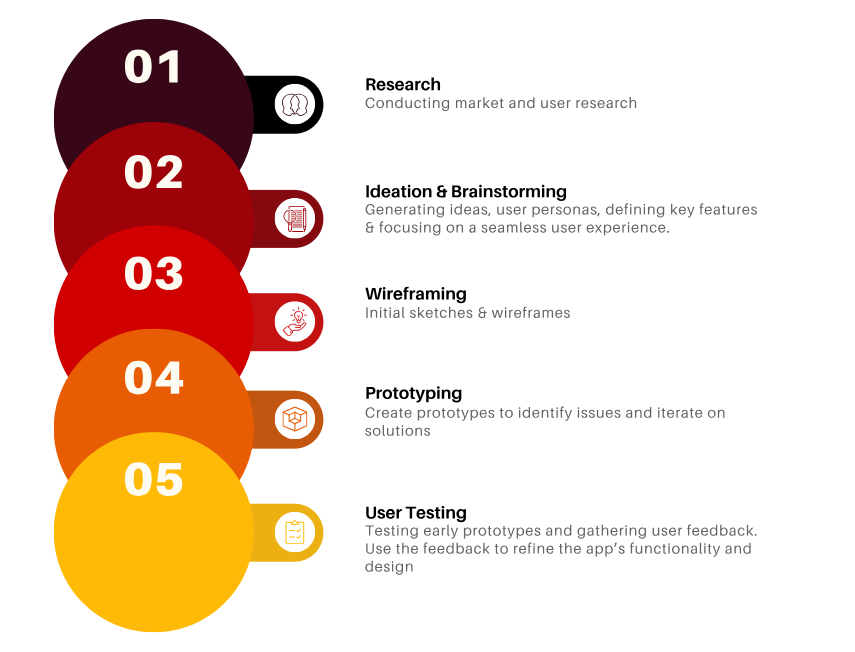
Design Process
1. Research
Competitor Analysis
In this section, I will conduct a competitor analysis comparing two leading car marketplace platforms namely AutoTrader and Cars.co.za. By examining their strengths, weaknesses, and key features, I aim to identify insights that can inform the design and functionality of the Motor Library MVP.
Feature Comparison Table
I also put together a comparison table to show the key features of the above competitor websites, including the additional website such as Gumtree and Motus. This feature analysis will help to determine the key features that our Motor Library MVP needs to possess in order to  be a key player in the market.
User Interviews
In addition to competitor analysis, I conducted user interviews to gain valuable insights into the needs, preferences, and pain points of potential users. These interviews helped identify the core features and functionalities that users expect from a car marketplace, enabling me to refine the Motor Library MVP to better align with user expectations and improve overall user experience.
Key areas
These are the key areas of focus for the user interviews.
  1. Identifying common frustrations and challenges users face when using existing car marketplace platforms
  2. Exploring how users make decisions when purchasing a vehicle
  3. Understanding the elements that contribute to user trust, including secure payment methods, clear dealership information, and review systems
  4. Exploring which specific features users would like to see in the Motor Library MVP, such as vehicle comparison tools, dealership profiles, or instant messaging with sellers
Key Questions
These are the key questions that will help us uncover critical insights into user needs.
  • 1. What are the biggest challenges you face when using car marketplaces to buy or sell vehicles?
  • 2. What features do you consider most important when browsing for cars online?
  • 3. How do you typically decide whether to trust a car listing or dealership on an online platform?
  • 4. How would you feel about using a platform that allows both dealerships and private sellers to list vehicles? What would make you feel more confident buying from both?
  • 5. What would make your experience buying or selling a car online more seamless and enjoyable?

2. Ideate & Brainstorming

Based on the user and market research conducted, I was able to define the target audience for Motor Library.
Target audience
The primary end user for Motor Library
  • 1. First Time Car buyers
  • 2. Experienced Car buyers
  • 3. Private Sellers
  • 4. Car Dealerships
  • 5. Car Enthusiasts
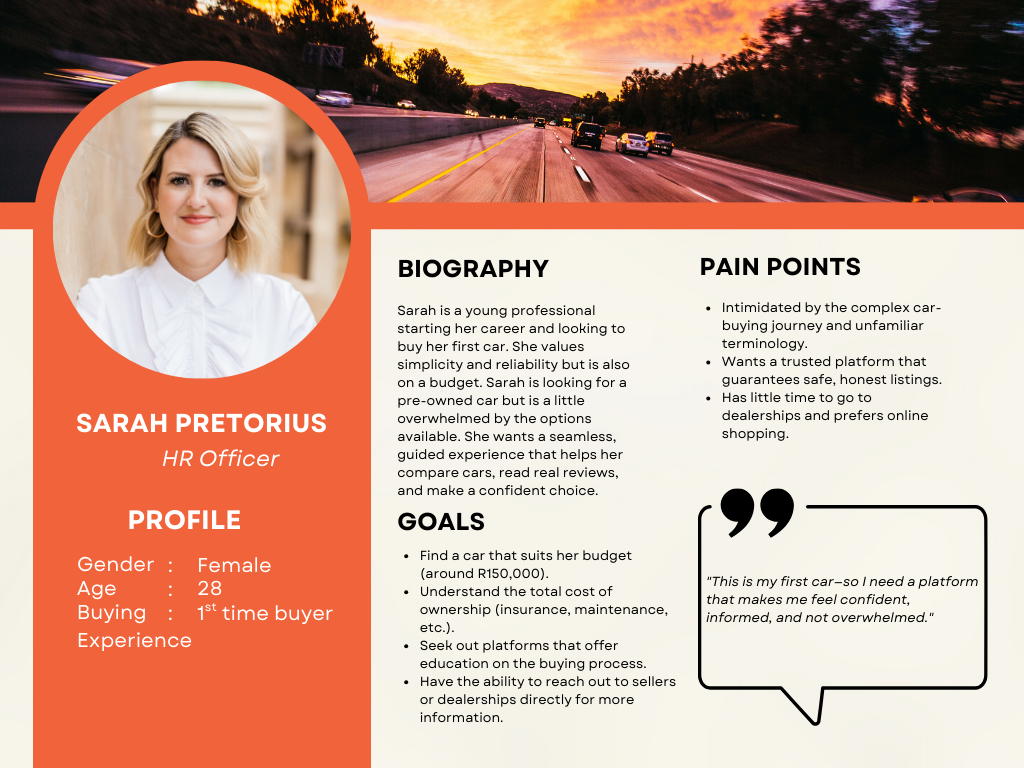
User Personas
To ensure that Motor Library caters to the diverse needs of our users, I focused on creating detailed user personas. These personas were developed through extensive research and interviews with potential users, helping to uncover their motivations, goals, and challenges in the car buying and selling process.
Defining Motor Library
About Motor Library
Motor Library is a responsive online car marketplace designed to simplify and streamline the vehicle buying and selling process. Built with both private buyers and sellers, as well as dealerships in mind, the platform aims to offer a trusted, transparent, and user-friendly experience. From discovery to decision, Motor Library empowers users with the tools, information, and confidence they need to navigate the automotive market with ease.
Key Features
Based on the user &  research conducted in the previous steps, I was able to identify the CORE features needed for our MVP
  • Homepage
  • Vehicle Listings & details Page
  • Message  Seller Feature
  • Post a Vehicle Page (for Sellers)
  • User Accounts - Login/ Sign Up
  • Responsive design
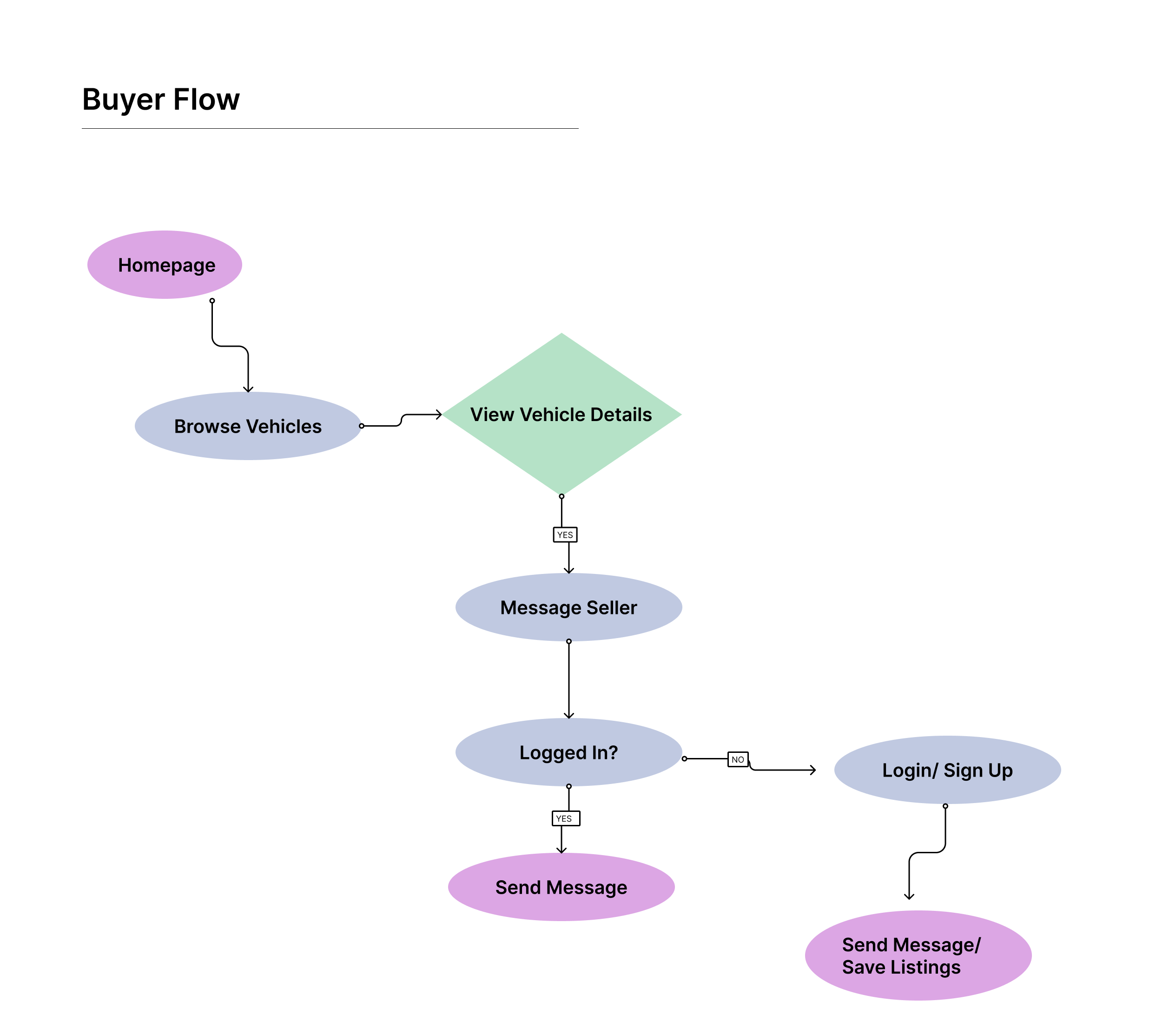
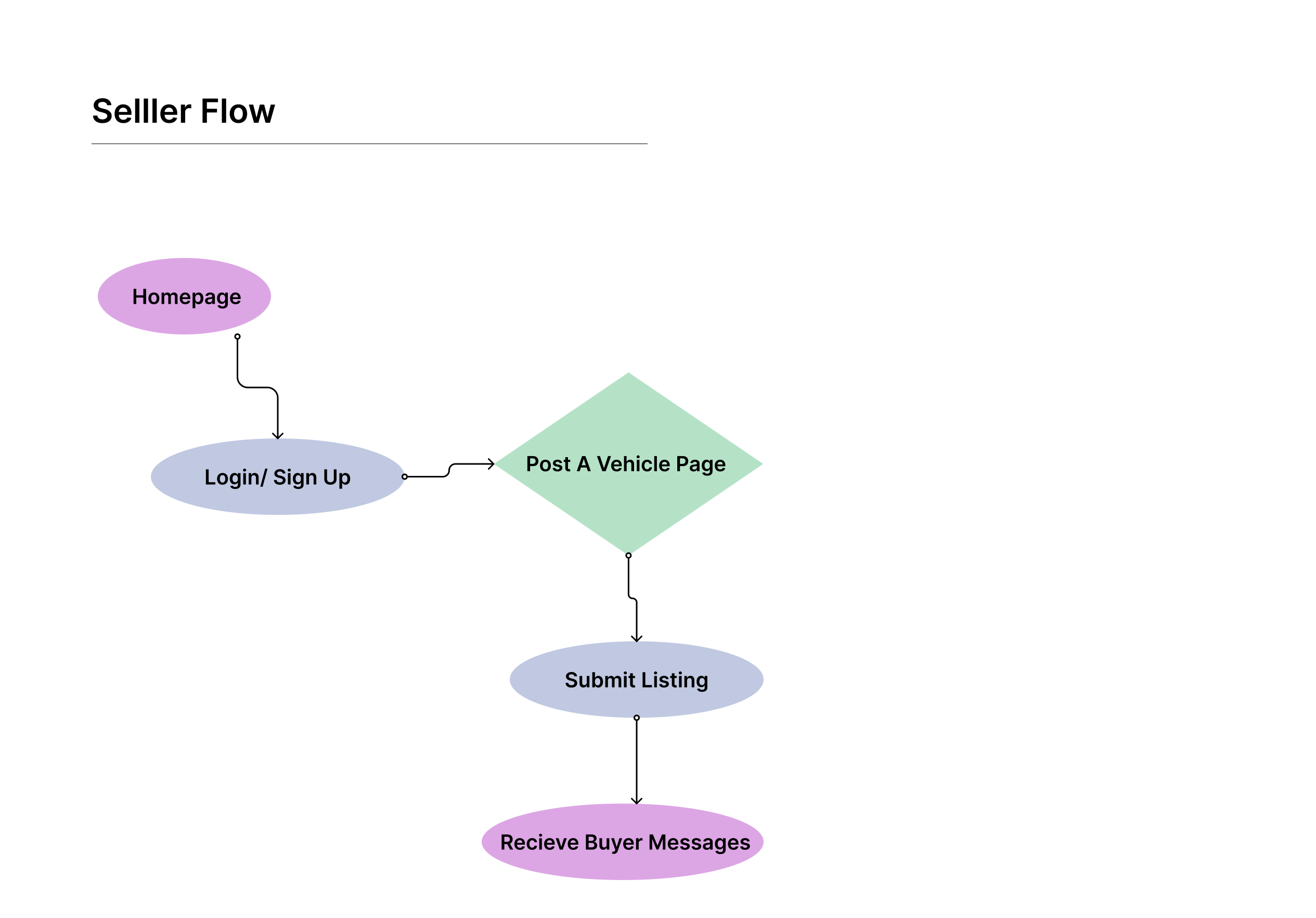
User Flows
I mapped out the core user flows for the Motor Library MVP. These flows represent the step-by-step journeys users take to accomplish key tasks within the app.
Sitemaps
I created a clear and focused sitemap for the Motor Library MVP. This visual structure outlines the primary pages and their relationships, helping to define how users will navigate through the platform, this is to create a seamless user experience.
Design System & Brand Guideline
Colour
Neutral pallette with a bold orange colour to draw attention to CTAs.
The selected color palette for Motor Library was chosen to reflect the platform’s bold, modern, and trustworthy identity within the automotive marketplace space. The colour palette is simple yet effective.
Typography
Font Pair: Avenir & Nunito Sans
In this project, I chose Avenir for headings and Nunito Sans for body text to maintain a balance between clarity, modernity, and professionalism which aligns with Motor Library's brand identity.

This font pairing reinforces Motor Library's tech forward yet user freindly identity. Avenir has a bold structure that helps to draw attention to key information, while Nunito Sans ensures a smooth reading experience.

3. Wireframing

Sketches
Mid Fidelity Wireframes
High Fidelity Screens
High Fidelity Mobile Screens

4. Prototype

5. User Testing

I conducted an unsupervised usablity testing session with 3 participants.
Objectives
  • Identify pain points in the vehicle discovery and inquiry flow
  • Gather feedback on navigation, content clarity, and interaction patterns
  • Understand how confident and informed users feel when exploring listings
Participants
  • 3 participants representing the target audience: car buyers aged 25–45 with varying levels of automotive knowledge.
  • All participants had prior experience browsing car listings online but preferred platforms with clear filters and visuals.
Tasks Tested
  1. Browse and filter car listings from the homepage
  2. View car details and specifications
  3. Save a car to favorites
  4. Sell your vehicle flow
Key Findings
Iterations
The following iterations were done based on the user testing feedback.
Add Feedback to User Actions
I introduced subtle animations or confirmation messages when users interact with key features like saving cars to favorites.
Future recommendations & Impact
Based on usability testing feedback, I identified several are for improvement that can significantly enhance user experience and support the app's long-term success:
Recommendations
  • Enhance Filtering Options
    Expand the filter system to include more specific options such as transmission type, year, mileage, and fuel type. This will support more targeted browsing and attract serious buyers.
  • Improve Inquiry Process Clarity
    Include a short explanation of what happens after an inquiry is submitted—e.g., “You’ll be contacted within 24 hours”—to build trust and set expectations.
  • Mobile Responsiveness and Accessibility
    Ensure all features work seamlessly across devices and meet accessibility guidelines for readability, contrast, and touch targets.
Future Impact

These improvements aim to streamline the browsing and decision-making process while building user trust and satisfaction. Over time, these refinements can increase user engagement, support higher conversion rates, and position Motor Library as a reliable go to marketplace for car buyers.